
 upgade to 1.0.3 from 1.0.2 still shows version 1.0.2
Uninstalled 1.0.2 and installed 1.0.3
version still shows 1.0.2


Blocks computers from: ManageEngine Desktop Central 10
We've been using/evaluating Unchecking in our business and have found that it blocks the following program: 'ManageEngine Desktop Central - Agent' from installing by the server applicaton: 'ManagedEngine Desktop Central 10'. This is used to manage the computers in our domain for software management, remote control, asset management etc. We've found that the Unchecky program is blocking our computer management software from communicating w/ the domain computers. This isn't blocking the software from 'installing' like it blocks a payload from installing like when installing Java, but it makes it so the ManageEngine server can't see the remote computer and/or blocks the ManageEngine agent from installing. Uninstalling Unchecky prompty resolves the issue.
 IOBit Malware Fighter
Upgrade to version 5.20.
http://download.cnet.com/IObit-Malware-Fighter/3000-8022_4-10967594.html?part=dl-&subj=dl&tag=button
report tools says "access is denied".

 AVG Anti-Virus Free
Technically, this isn’t an install screen, as I had already installed (then upgraded) AVG Free, but AVG prompted me that it needed to reboot to upgrade. When Windows 10 came back up, this prompt was on the screen.
I'm not sure what version of AVG was installed before I rebooted (I originally installed v. 16.6 but probably upgraded in between); however, after the reboot, it is v. 17.5.3021. Here's a link to the current install program. I do have a copy of the v. 16.6 installer also.
Unfortunately, the info tool gave an error: https://unchecky.com/info_tool?1499730220_fcI1ZQi9ZL8dNOrB
I’m guessing you might not be able to correct this, but it was quite tricky, and there’s no exit button, so if someone didn’t think to uncheck the boxes before clicking Continue, they could easily be fooled into installing Chrome (which I'm avoiding, at this point).

Can there be a mac version?
I use mac 98% of the time, and I install things a lot. Could you please make a mac version? Thanks, Brenden L.
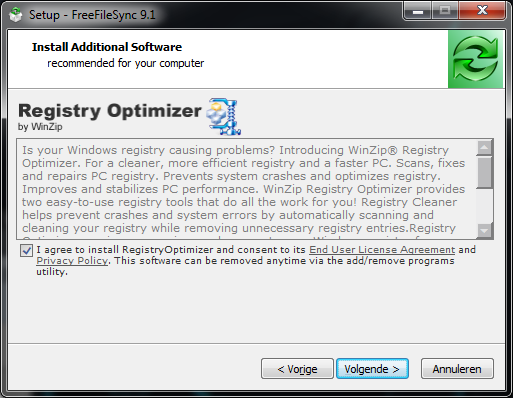
Unchecky is not working with WinZip Registry Optimizer in FreeFileSync setup
Unchecky does not work with Registry Optimizer by WinZip in the FreeFileSync 9.1 setup.
Setup here: https://www.freefilesync.org/download.php
Do not remove the tick
Чи не знімайте галочку в створенні Do not remove the tick in establishing ZonaSetup [8NStj] .exe
I have never seen Unchecky work before.
Hello. I have had Unchecky installed on my computer after being recommended by a malware removal expert suggested it to me. However, I have never gotten any reports of it unchecking any boxes or otherwise blocking PUPs on any downloads I have made. I thought that maybe the programs I had been downloading were all legitimate and had no third party software they wanted to bundle it with. However, today I enlisted another malware removal expert to help check my computer for any encrypted files after my antivirus blocked Cerber, he said no files were encrypted but did apparently find some PUPs lying around, which we cleaned out with FRST and AdwCleaner. I was just wondering if perhaps Unchecky is just being buggy for me, and if I should try to uninstall and reinstall it. Any opinions? Thanks.
Kundesupport af UserEcho